
Memperbaiki Error MySql di XAMPP
Berikut ini tips cara mengatasi database Mysql Kita yang ada di xampp error tidak bisa di START. Langsung aja begini colusinya.
- Jika muncul error saat proses START
- Status change detected: stopped 07:12:26 [mysql] Error: MySQL shutdown unexpectedly. 07:12:26 [mysql] This may be due to a blocked port, missing dependencies, 07:12:26 [mysql] improper privileges, a crash, or a shutdown by another method. 07:12:26 [mysql] Press the Logs button to view error logs and check 07:12:26 [mysql] the Windows Event Viewer for more clues 07:12:26 [mysql] If you need more help, copy and post this 07:12:26 [mysql] entire log window on the forums
- Kemudian cek lognya xampp/mysql/data/mysql_error.log
- Jika lognya seperti ini Cannot find checkpoint record at LSN (1,0x565e)
2026-02-02 7:12:24 0 [ERROR] mysqld.exe: Aria recovery failed. Please run aria_chk -r on all Aria tables and delete all aria_log.######## files
2026-02-02 7:12:24 0 [ERROR] Plugin ‘Aria’ registration as a STORAGE ENGINE failed.
2026-02-02 7:12:24 0 [Note] InnoDB: Mutexes and rw_locks use Windows interlocked functions
2026-02-02 7:12:24 0 [Note] InnoDB: Uses event mutexes
2026-02-02 7:12:24 0 [Note] InnoDB: Compressed tables use zlib 1.3
2026-02-02 7:12:24 0 [Note] InnoDB: Number of pools: 1
2026-02-02 7:12:24 0 [Note] InnoDB: Using SSE2 crc32 instructions
2026-02-02 7:12:24 0 [Note] InnoDB: Initializing buffer pool, total size = 16M, instances = 1, chunk size = 16M
2026-02-02 7:12:24 0 [Note] InnoDB: Completed initialization of buffer pool
2026-02-02 7:12:24 0 [Note] InnoDB: 128 out of 128 rollback segments are active.
2026-02-02 7:12:24 0 [Note] InnoDB: Creating shared tablespace for temporary tables
2026-02-02 7:12:24 0 [Note] InnoDB: Setting file ‘C:\xampp\mysql\data\ibtmp1’ size to 12 MB. Physically writing the file full; Please wait …
2026-02-02 7:12:24 0 [Note] InnoDB: File ‘C:\xampp\mysql\data\ibtmp1’ size is now 12 MB.
2026-02-02 7:12:24 0 [Note] InnoDB: 10.4.32 started; log sequence number 9027404; transaction id 14417
2026-02-02 7:12:24 0 [Note] InnoDB: Loading buffer pool(s) from C:\xampp\mysql\data\ib_buffer_pool
2026-02-02 7:12:24 0 [Note] Plugin ‘FEEDBACK’ is disabled.
2026-02-02 7:12:24 0 [ERROR] Could not open mysql.plugin table. Some plugins may be not loaded
2026-02-02 7:12:24 0 [ERROR] Failed to initialize plugins.
2026-02-02 7:12:24 0 [ERROR] Aborting - Stop semua service dan Close aplikasi xampp
- Hapus file yang korup atau rusak yaitu file aria. Yatu aria_log.00000001, aria_log.00000002 dan aria_log_control
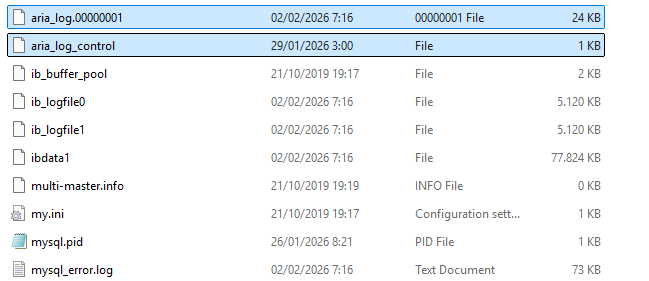
- Jalankan proses perbaikan cd C:\xampp\mysql\bin >>> aria_chk -o -f C:\xampp\mysql\data\mysql\*.MAI Penjelasan:
-o= safe-recover-f= force - Tunggu sampai selesai
- Coba start MySQL di XAMPP
Begitu saja kok prosesnya. Mudah kan…